

티스토리 뷰
🔍 Langfuse란?
개요
Langfuse는 LLM 애플리케이션을 위한 오픈소스 observability 및 analytics 플랫폼입니다.
쉽게 말해, AI 앱의 "Firebase Analytics + Crashlytics" 같은 역할을 합니다.
핵심 기능
1. 자동 추적 (Tracing)
- 모든 LLM API 호출 기록
- 입력/출력 저장
- 응답 시간 측정
2. 비용 분석 (Cost Tracking)
- 토큰 사용량 추적
- 실시간 비용 계산
- 모델별 비용 분석
3. 성능 모니터링
- 평균 응답 시간
- 에러율 추적
- 병목 지점 파악
4. 프롬프트 관리
- 프롬프트 버전 관리
- A/B 테스팅
- 성능 비교
왜 필요한가?
❌ Langfuse 없이:
"오늘 API 몇 번 호출했지?"
"이번 달 비용이 얼마지?"
"어디서 에러 났지?"
→ 알 수 없음

✅ Langfuse 사용:
대시보드에서 한눈에 확인!
- 오늘 API 호출: 127번
- 이번 달 비용: $12.34
- 에러율: 2.1%
🎯 목표
이번 프로젝트에서는 다음을 구현했습니다:
- Kotlin + Spring Boot로 REST API 서버 구축
- OpenAI API를 활용한 번역 기능
- Langfuse를 통한 LLM 호출 모니터링
최종 결과물: 모든 AI 호출을 추적하고 비용/성능을 실시간으로 확인할 수 있는 번역 API
🛠️ 기술 스택
- 언어: Kotlin
- 프레임워크: Spring Boot 3.4.1
- LLM: OpenAI GPT-4o-mini
- 모니터링: Langfuse
- 빌드 도구: Gradle
Step 1. Spring Boot 프로젝트 생성
1-1 Spring Initializr로 프로젝트 생성
https://start.spring.io/ 에서 다음과 같이 설정:
Project: Gradle - Kotlin
Language: Kotlin
Spring Boot: 4.0.1
Java: 17

Group: com.example
Artifact: langfuse-demo

Dependencies:
- Spring Web
- Spring Boot DevTools
GENERATE 버튼을 클릭하여 프로젝트 다운로드 후 압축 해제
1-2 프로젝트 구조
langfuse-demo/
├── src/
│   ├── main/
│   │   ├── kotlin/
│   │   │   └── com/example/langfusedemo/
│   │   │       └── LangfuseDemoApplication.kt
│   │   └── resources/
│   │       └── application.properties
│   └── test/
├── build.gradle.kts
└── settings.gradle.kts
Step 2. Kotlin REST API 구현
2-1 의존성 추가
build.gradle.kts에 필요한 라이브러리 추가:
dependencies {
    implementation("org.springframework.boot:spring-boot-starter-web")
    developmentOnly("org.springframework.boot:spring-boot-devtools")
    testImplementation("org.springframework.boot:spring-boot-starter-test")

    // OpenAI
    implementation("com.aallam.openai:openai-client:3.6.3")
    implementation("io.ktor:ktor-client-okhttp:2.3.7")

    // HTTP 클라이언트 (Langfuse API 호출용)
    implementation("com.squareup.okhttp3:okhttp:4.12.0")
    implementation("com.google.code.gson:gson:2.10.1")
}
2-2 데이터 클래스 정의
TranslationRequest.kt
package com.example.langfusedemo

data class TranslationRequest(
    val text: String,
    val targetLanguage: String
)
TranslationResponse.kt
package com.example.langfusedemo

data class TranslationResponse(
    val originalText: String,
    val translatedText: String,
    val targetLanguage: String,
    val traceId: String? = null
)
2-3 Controller 구현
TranslationController.kt
package com.example.langfusedemo

import org.springframework.web.bind.annotation.*
import org.springframework.beans.factory.annotation.Value
import com.aallam.openai.api.chat.ChatCompletionRequest
import com.aallam.openai.api.chat.ChatMessage
import com.aallam.openai.api.chat.ChatRole
import com.aallam.openai.api.model.ModelId
import com.aallam.openai.client.OpenAI
import kotlinx.coroutines.runBlocking

@RestController
@RequestMapping("/api")
class TranslationController(
    private val langfuseService: LangfuseService
) {

    @Value("\${openai.api.key}")
    private lateinit var openAiApiKey: String

    @PostMapping("/translate")
    fun translate(@RequestBody request: TranslationRequest): TranslationResponse = runBlocking {
        val openAI = OpenAI(openAiApiKey)

        val chatRequest = ChatCompletionRequest(
            model = ModelId("gpt-4o-mini"),
            messages = listOf(
                ChatMessage(
                    role = ChatRole.System,
                    content = "You are a professional translator. Translate the given text to ${request.targetLanguage}. Only return the translation, no explanations."
                ),
                ChatMessage(
                    role = ChatRole.User,
                    content = request.text
                )
            )
        )

        val completion = openAI.chatCompletion(chatRequest)
        val translatedText = completion.choices.first().message.content ?: "Translation failed"

        // Langfuse에 로깅
        val traceId = langfuseService.logTrace(
            name = "translation",
            input = mapOf(
                "text" to request.text,
                "targetLanguage" to request.targetLanguage
            ),
            output = mapOf("translation" to translatedText),
            model = "gpt-4o-mini",
            usage = mapOf(
                "promptTokens" to (completion.usage?.promptTokens ?: 0),
                "completionTokens" to (completion.usage?.completionTokens ?: 0),
                "totalTokens" to (completion.usage?.totalTokens ?: 0)
            )
        )

        TranslationResponse(
            originalText = request.text,
            translatedText = translatedText,
            targetLanguage = request.targetLanguage,
            traceId = traceId
        )
    }
}
Step 3. OpenAI 연동
3-1 API 키 설정
application.properties 파일 수정:
properties
spring.application.name=langfuse-demo

# Server
server.port=8080

# OpenAI
openai.api.key=sk-proj-YOUR_API_KEY
3-2 테스트
서버 실행:
./gradlew bootRun
API 테스트:
bash
curl -X POST http://localhost:8080/api/translate \
  -H "Content-Type: application/json" \
  -d '{
    "text": "안녕하세요",
    "targetLanguage": "English"
  }'
응답 예시:
json
{
  "originalText": "안녕하세요",
  "translatedText": "Hello",
  "targetLanguage": "English",
  "traceId": null
}
✅ 번역 API 작동 확인!
Step 4. Langfuse 연동
4-1 Langfuse 계정 생성
- https://cloud.langfuse.com 접속
- GitHub 계정으로 로그인
- 새 프로젝트 생성 (예: langfuse-demo)
- Settings → API Keys에서 키 복사:
- Public Key (pk-lf-...)
- Secret Key (sk-lf-...)
- Base URL (https://cloud.langfuse.com)
4-2 설정 파일 업데이트
application.properties에 Langfuse 설정 추가:
properties
spring.application.name=langfuse-demo

# Server
server.port=8080

# OpenAI
openai.api.key=sk-proj-YOUR_API_KEY

# Langfuse
langfuse.public.key=pk-lf-YOUR_PUBLIC_KEY
langfuse.secret.key=sk-lf-YOUR_SECRET_KEY
langfuse.base.url=https://cloud.langfuse.com
4-3 Langfuse Service 구현
LangfuseService.kt
package com.example.langfusedemo

import com.google.gson.Gson
import okhttp3.MediaType.Companion.toMediaType
import okhttp3.OkHttpClient
import okhttp3.Request
import okhttp3.RequestBody.Companion.toRequestBody
import org.springframework.beans.factory.annotation.Value
import org.springframework.stereotype.Service
import java.util.*

@Service
class LangfuseService {

    @Value("\${langfuse.public.key}")
    private lateinit var publicKey: String

    @Value("\${langfuse.secret.key}")
    private lateinit var secretKey: String

    @Value("\${langfuse.base.url}")
    private lateinit var baseUrl: String

    private val client = OkHttpClient()
    private val gson = Gson()

    fun logTrace(
        name: String,
        input: Any,
        output: Any,
        model: String,
        usage: Map<String, Int>
    ): String {
        val traceId = UUID.randomUUID().toString()
        val generationId = UUID.randomUUID().toString()

        // ISO 8601 형식으로 timestamp 생성
        val timestamp = java.time.Instant.now().toString()

        val batch = mapOf(
            "batch" to listOf(
                mapOf(
                    "id" to UUID.randomUUID().toString(),
                    "type" to "trace-create",
                    "timestamp" to timestamp,
                    "body" to mapOf(
                        "id" to traceId,
                        "name" to name,
                        "input" to input,
                        "output" to output
                    )
                ),
                mapOf(
                    "id" to UUID.randomUUID().toString(),
                    "type" to "generation-create",
                    "timestamp" to timestamp,
                    "body" to mapOf(
                        "id" to generationId,
                        "traceId" to traceId,
                        "name" to "openai-call",
                        "model" to model,
                        "input" to input,
                        "output" to output,
                        "usage" to mapOf(
                            "input" to usage["promptTokens"],
                            "output" to usage["completionTokens"],
                            "total" to usage["totalTokens"]
                        )
                    )
                )
            )
        )

        sendToLangfuse(batch)
        return traceId
    }

    private fun sendToLangfuse(payload: Map<String, Any>) {
        try {
            val json = gson.toJson(payload)
            val body = json.toRequestBody("application/json".toMediaType())

            val auth = Base64.getEncoder().encodeToString("$publicKey:$secretKey".toByteArray())

            val request = Request.Builder()
                .url("$baseUrl/api/public/ingestion")
                .addHeader("Authorization", "Basic $auth")
                .addHeader("Content-Type", "application/json")
                .post(body)
                .build()

            client.newCall(request).execute().use { response ->
                if (!response.isSuccessful) {
                    println("❌ Langfuse error: ${response.code}")
                    println("Response: ${response.body?.string()}")
                } else {
                    println("✅ Langfuse logged successfully")
                }
            }
        } catch (e: Exception) {
            println("❌ Langfuse exception: ${e.message}")
            e.printStackTrace()
        }
    }
}
4-4 최종 테스트
서버 재시작 후 API 호출:
curl -X POST http://localhost:8080/api/translate \
  -H "Content-Type: application/json" \
  -d '{
    "text": "디버깅 테스트",
    "targetLanguage": "English"
  }'
```

**서버 로그 확인:**
```
✅ Langfuse logged successfully
Langfuse 대시보드 확인:
- https://cloud.langfuse.com 접속
- 프로젝트 선택
- Traces 메뉴에서 데이터 확인!
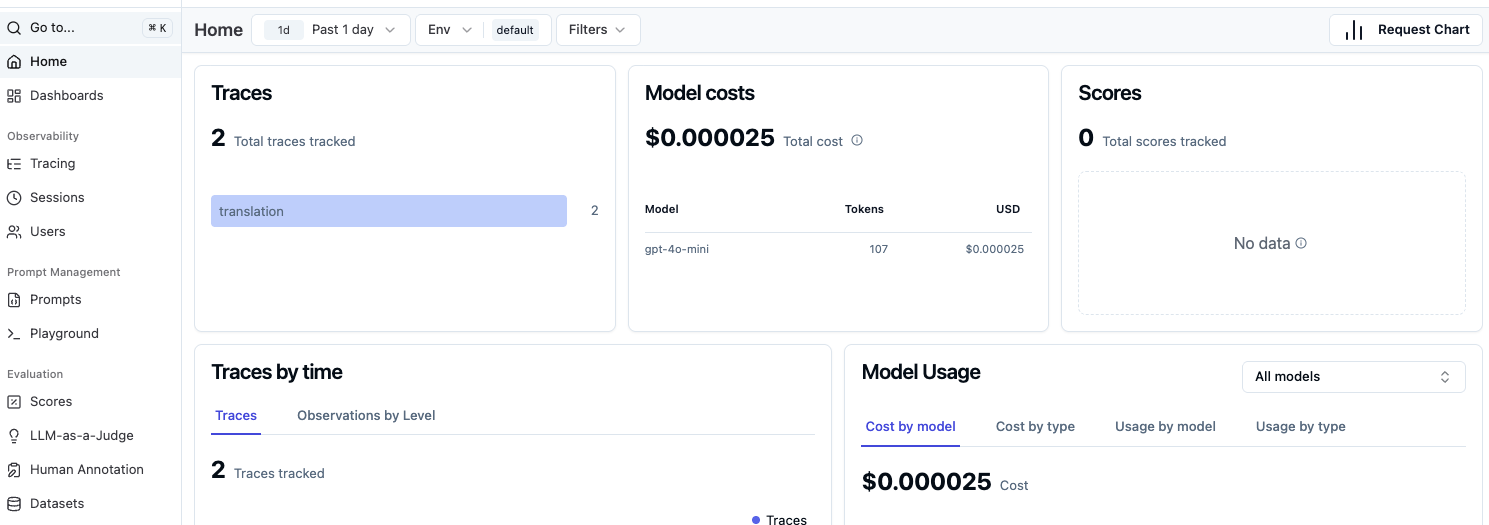
🎉 결과
Langfuse 대시보드에서 확인 가능한 정보:
- Traces: 모든 API 호출 기록
- Model costs: 사용한 비용 (예: $0.000007)
- Token usage: 입력/출력 토큰 수
- Latency: 응답 시간
- Input/Output: 실제 요청/응답 내용
🔍 핵심 포인트
1. Timestamp 형식 주의
// ❌ 잘못된 형식
val timestamp = System.currentTimeMillis() // 숫자

// ✅ 올바른 형식
val timestamp = java.time.Instant.now().toString() // ISO 8601
Langfuse API는 ISO 8601 형식의 timestamp를 요구합니다.
2. Batch 형식으로 전송
Langfuse Ingestion API는 배치 형식으로 여러 이벤트를 한 번에 받습니다:
- trace-create: Trace 생성
- generation-create: LLM 호출 기록
3. Basic Auth 인증
val auth = Base64.getEncoder()
    .encodeToString("$publicKey:$secretKey".toByteArray())
Public Key와 Secret Key를 Base64로 인코딩하여 인증합니다.
🚀 다음 단계
이제 기본적인 모니터링 시스템이 완성되었습니다. 다음으로 할 수 있는 것들:
- RAG 시스템 구축: 벡터DB를 추가하여 문서 검색 기능
- Agent 개발: LangGraph로 복잡한 워크플로우 구현
- 멀티모달: 이미지, 음성 입력 처리
- 프론트엔드 연동: TypeScript + React로 웹 UI 추가
📚 참고 자료
- Total
- Today
- Yesterday
- Flutter
- retrofit
- Kotlin
- error
- 재귀함수
- Firebase
- Android Studio
- message
- Crop
- ios
- Token
- https
- Hilt
- FCM
- ScrollView
- listener
- Custom
- node.js
- bitmap
- android
- 코딩테스트
- GitHub
- direction
- API
- app bundle
- java
- ec2
- flutter_new_badger
- ExoPlayer
- 알고리즘
| 일 | 월 | 화 | 수 | 목 | 금 | 토 |
|---|---|---|---|---|---|---|
| 1 | 2 | 3 | ||||
| 4 | 5 | 6 | 7 | 8 | 9 | 10 |
| 11 | 12 | 13 | 14 | 15 | 16 | 17 |
| 18 | 19 | 20 | 21 | 22 | 23 | 24 |
| 25 | 26 | 27 | 28 | 29 | 30 | 31 |